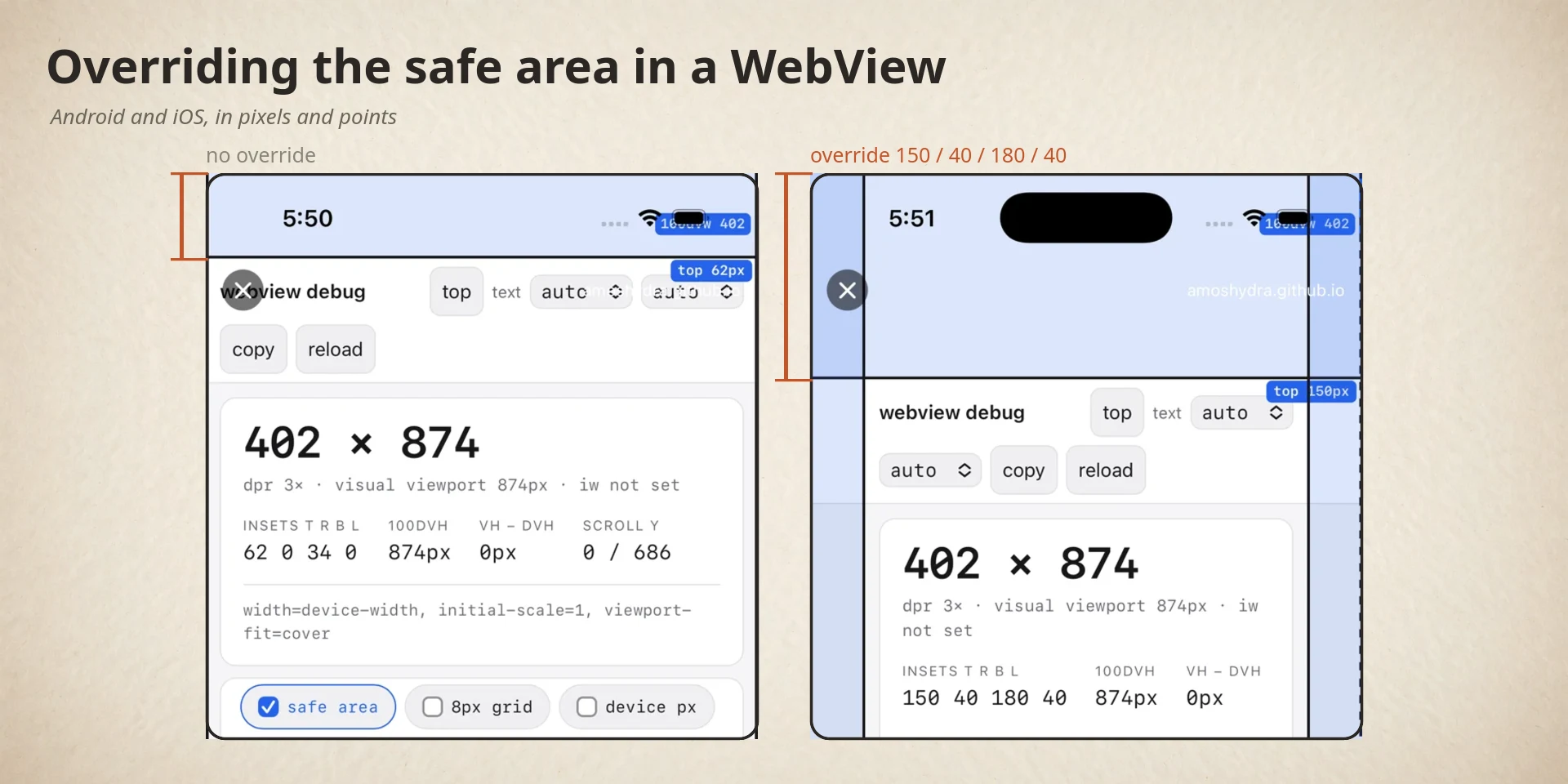
Overriding env(safe-area-inset-*) in a WebView: Android and iOS
Sometimes a WebView host needs the page to see a safe area the device does not
have. A kiosk view, a video player that should ignore the home indicator, a test
harness that wants deterministic insets. You need env(safe-area-inset-bottom)
to return 0px so the page stops reserving space for a home bar that isn’t
there.
Since this post went up, the case I keep running into is the opposite one: a host needs to remove an inset the device really has, because the app has already handled it. Gadgetbridge’s Bangle.js app manager is one. On Android 15 the app is edge-to-edge, so the platform hands its WebView the real status-bar and navigation-bar insets, and the app’s own native title bar has already made room for them. The page pads for a safe area that is already padded, and sits one status bar too low. The host’s fix is to stop passing those insets down, which is the override this post is about.
The figure below is a reference for the Android terms this post uses. iOS has a single safe area and no equivalent names, so it is Android-only.
Hover or focus a number to highlight it on the screen.
systemBars().ConstraintLayout holding nothing but the WebView; Gadgetbridge wraps a LinearLayout around it.The window is the rectangle the screen draws into. Here that is the whole
screen, because the app is edge-to-edge. The system bars are the status bar,
the navigation bar and the caption bar; Android reports their sizes together as
systemBars(). android.R.id.content is the frame Android puts the app’s
layout into. A host pads this view to keep its content clear of the bars.
Both platforms let you override those numbers. The mechanisms are completely different, and each fails silently. iOS additionally has a WebKit bug that makes a working override look broken. The keyboard is a second channel of the same mechanism, covered in The keyboard is a second channel below.
Before and after
Both platforms, same page, same requested insets. Overrides requested were
top 150, right 40, bottom 180, left 40.
iOS: iPhone 16 Pro simulator, iOS 18.6
| No override | Override 150/40/180/40 |
|---|---|
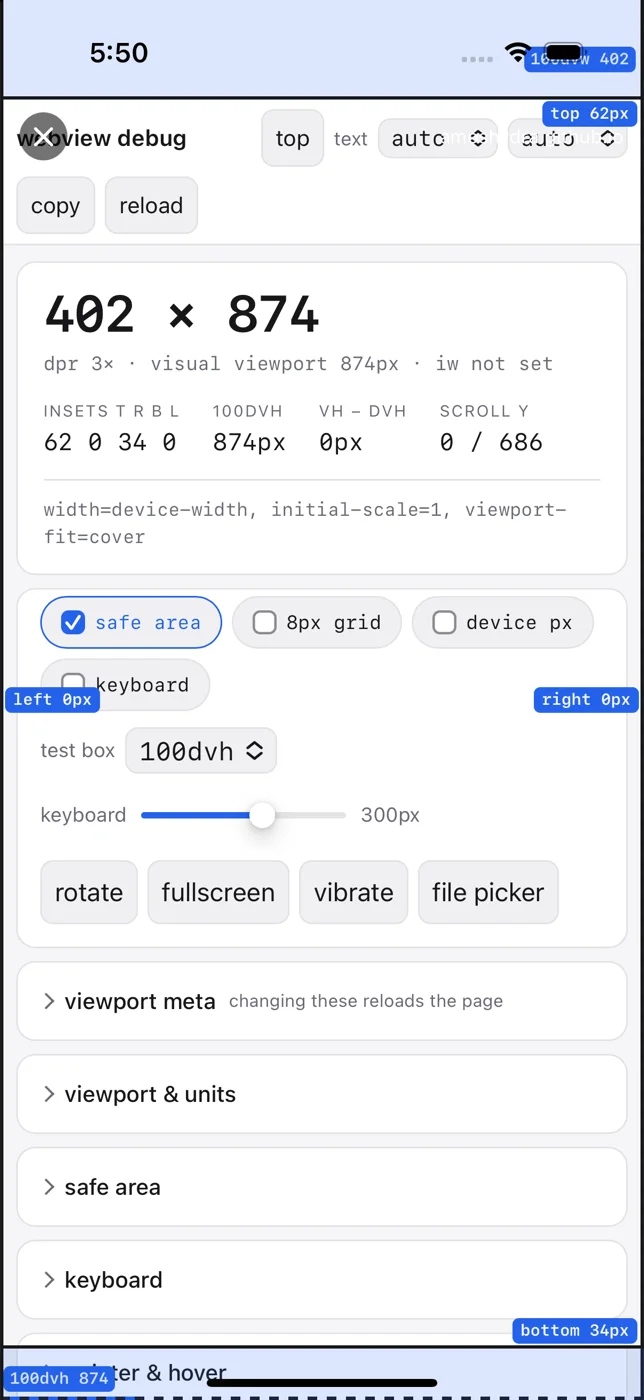 | 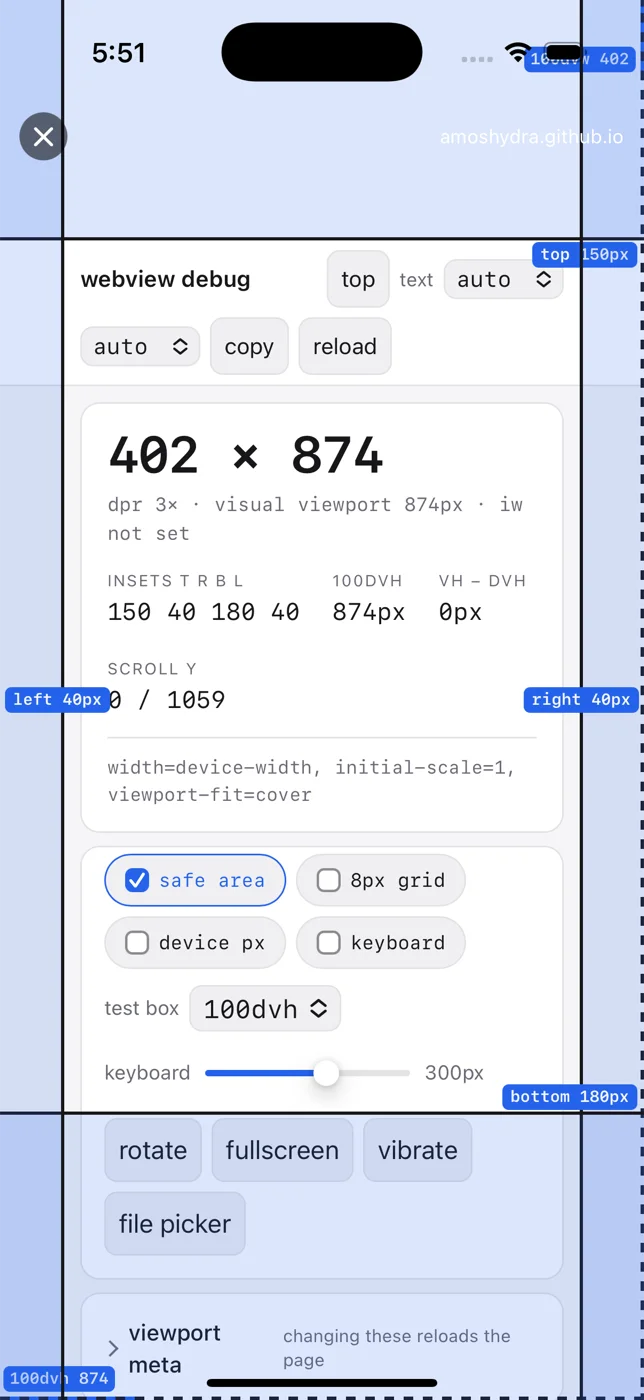 |
62 0 34 0 → 150 40 180 40. The real top inset is 62pt (the notch); the
override replaced it. The blue overlay labels track the change.
Android: physical device, Android 15, WebView 153
| No override | Override 150/40/180/40 |
|---|---|
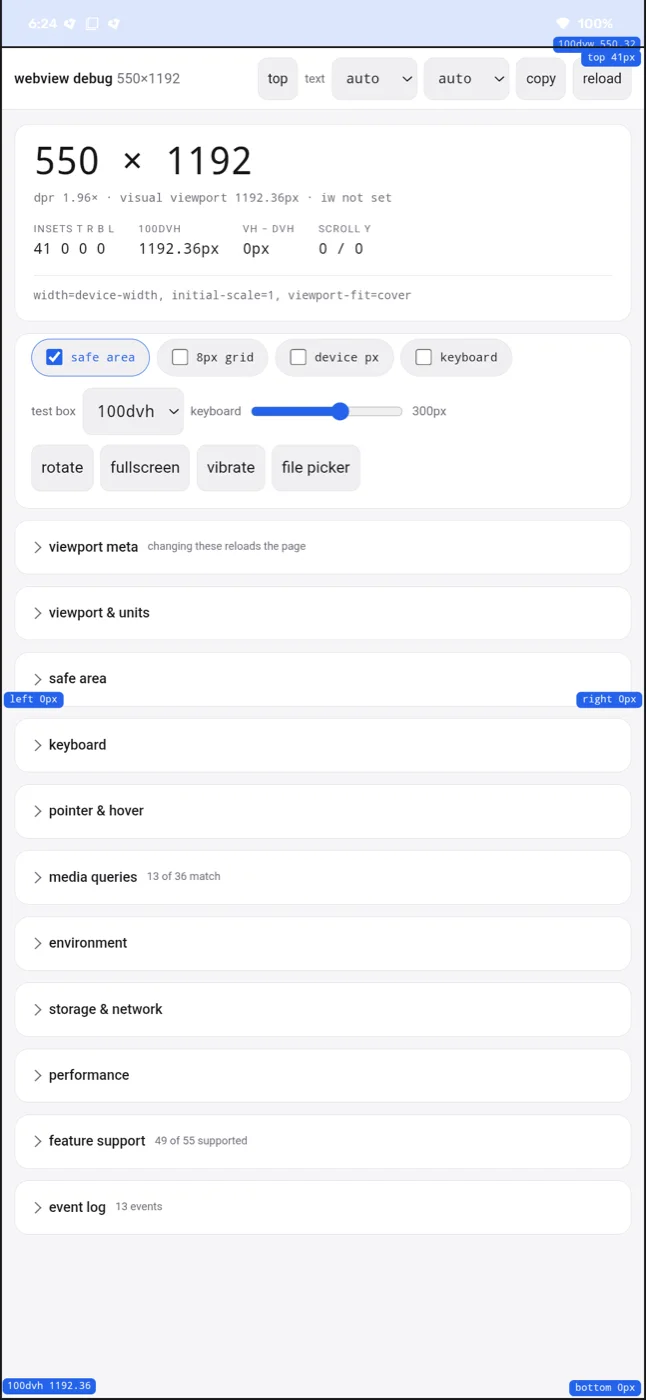 | 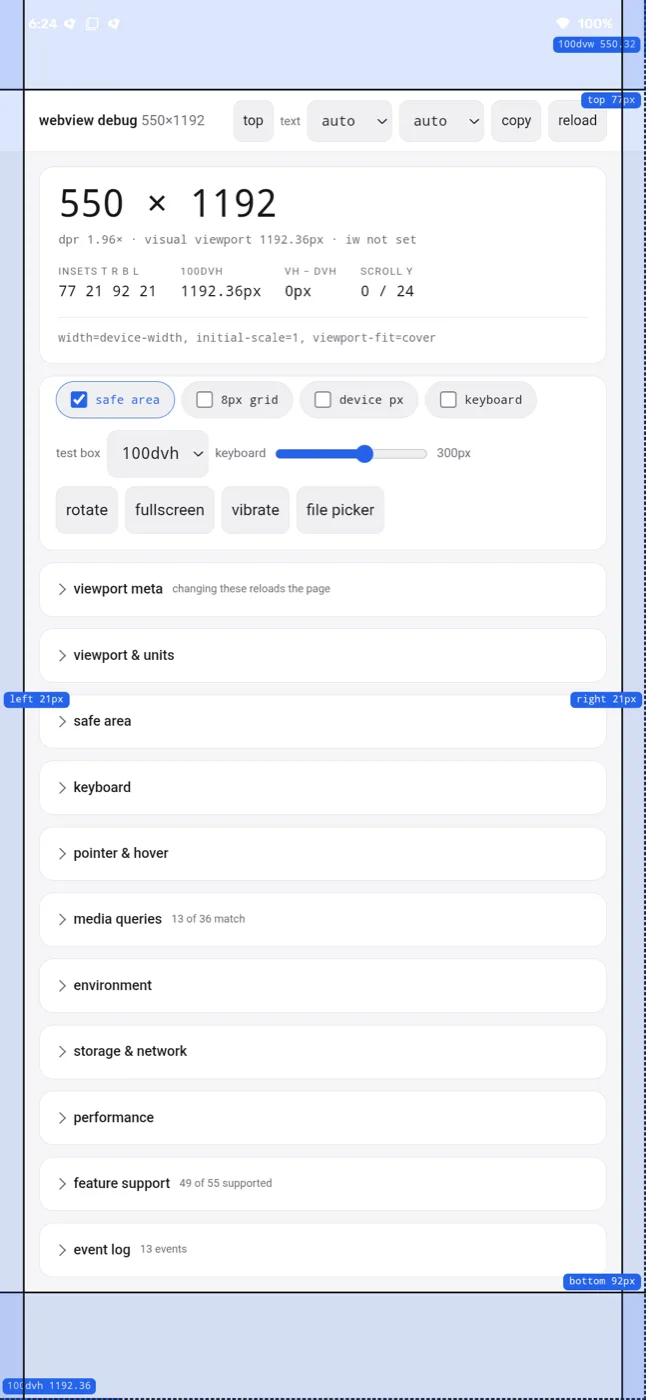 |
41 0 0 0 → 77 21 92 21. Note the unit difference. Android’s override is
in physical pixels and CSS sees the result divided by dpr (1.96 here:
150/1.96 ≈ 77). iOS’s override is in points, which already are CSS pixels, so
150 in, 150px out. If you port an override value between platforms you must
multiply by dpr on the Android side.
Android: the mechanism
Android WebView computes the page’s safe-area insets inside an internal
AwContents view, from the WindowInsets that reach it:
int insetTypes = displayCutout() | systemBars();Insets safeArea = toWindowInsetsCompat(insets).getInsets(insetTypes);So the only lever is the insets themselves. Subclass WebView and override
onApplyWindowInsets:
@Overridepublic WindowInsets onApplyWindowInsets(WindowInsets insets) {    if (!hasInsetOverride() || Build.VERSION.SDK_INT < Build.VERSION_CODES.R) {        return super.onApplyWindowInsets(insets);    }    return super.onApplyWindowInsets(applyOverrides(insets));}
private WindowInsets applyOverrides(WindowInsets insets) {    WindowInsets.Builder builder = new WindowInsets.Builder(insets);    int[] types = {        WindowInsets.Type.statusBars(),        WindowInsets.Type.navigationBars(),        WindowInsets.Type.captionBar(),        WindowInsets.Type.displayCutout(),    };    for (int type : types) {        Insets current = insets.getInsets(type);        builder.setInsets(type, Insets.of(            leftOverride   != null ? leftOverride   : current.left,            topOverride    != null ? topOverride    : current.top,            rightOverride  != null ? rightOverride  : current.right,            bottomOverride != null ? bottomOverride : current.bottom));    }    return builder.build();}
Condensed from
InsetAwareWebView.java;
that class is 101 lines and this is all of it that matters.
One line in that excerpt is out of date. The gate reads VERSION_CODES.R, which
is API 30, and the floor is really 31, for the dispatch-order reason given below.
Three things that each cost someone a day:
A listener on the WebView cannot do this. A listener is called instead of
the view’s own onApplyWindowInsets, so one set on the WebView replaces the
handling that feeds AwContents: the rebuilt insets go back to the caller, not
down into the widget. Overriding onApplyWindowInsets works because
ViewGroup.dispatchApplyWindowInsets passes its return value down to children,
and AwContents is one.
A listener on the WebView’s parent also works, for the same reason in reverse: the parent’s dispatch hands the modified insets to each of its children. The keyboard fix later in this post uses that.
Correction: the first version of this post said a listener could never do this. That is only true when the listener is on the WebView itself.
Every edge must be set on every type in the mask. getInsets(mask) returns
the per-edge maximum across the mask. Overriding only navigationBars() leaves
a non-zero bottom wherever a display cutout also contributes one.
Requires API 31+, and only works in edge-to-edge mode, because otherwise the
framework consumes the insets before the WebView sees them. In that mode the
status bar stays visible but transparent; hiding it zeroes the statusBars()
inset, which leaves the page with a top inset of zero and hides the cutout from
it.
The floor is 31 rather than 30 because of who gets to consume the dispatch. On
API 28 to 30 the WebView provider installs its own OnApplyWindowInsetsListener
on the container view that wraps your WebView, and Android stops delivering
insets as soon as a listener consumes them, so the onApplyWindowInsets you
overrode is never reached. From API 31 the provider hooks onApplyWindowInsets
on a view inside the WebView instead, which sits below yours, so yours runs
first. There is no API 28 to 30 device in the matrix below, so that part rests
on the code path rather than on a measurement.
iOS: the mechanism
Much smaller, because there is no interception layer to hook. WebKit derives the
page’s env(safe-area-inset-*) from the receiving view’s safeAreaInsets, so
overriding that one getter is the whole mechanism:
final class InsetOverrideWebView: WKWebView {    /// Per-edge overrides in points. `nil` leaves that edge at the real system value.    var insetOverride = InsetOverride() {        didSet {            guard insetOverride != oldValue else { return }            // UIKit memoises safe-area geometry per layout pass, so the override is            // only re-read once something invalidates that cache.            setNeedsLayout()            invalidateIntrinsicContentSize()        }    }
    override var safeAreaInsets: UIEdgeInsets {        insetOverride.applying(to: super.safeAreaInsets)    }}
struct InsetOverride: Equatable {    var top: CGFloat?    var right: CGFloat?    var bottom: CGFloat?    var left: CGFloat?
    var isEmpty: Bool { top == nil && right == nil && bottom == nil && left == nil }
    func applying(to base: UIEdgeInsets) -> UIEdgeInsets {        UIEdgeInsets(            top: top ?? base.top,            left: left ?? base.left,            bottom: bottom ?? base.bottom,            right: right ?? base.right        )    }
    static func parseEdges(top: String, right: String,                           bottom: String, left: String) -> InsetOverride {        InsetOverride(top: parse(top), right: parse(right),                      bottom: parse(bottom), left: parse(left))    }
    /// Blank = leave at the real system value. Non-numeric is treated the same    /// way rather than silently becoming 0.    private static func parse(_ raw: String) -> CGFloat? {        let trimmed = raw.trimmingCharacters(in: .whitespacesAndNewlines)        guard !trimmed.isEmpty, let value = Double(trimmed), value >= 0 else { return nil }        return CGFloat(value)    }}
Condensed from
InsetOverrideWebView.swift.
The comment above insetOverride is the same one, and it is worth reading in
place: UIKit memoises safe-area geometry per layout pass, so an override that is
not read after something invalidates that cache silently does nothing.
nil per edge means “use the real system value”. Values are deliberately not
clamped, so a value larger than the real inset pushes content further in, which
is the point when you’re inflating a fake inset.
Verified per-edge independence on iOS 27.0, with only top overridden:
| Config | webView.safeAreaInsets | page env() |
|---|---|---|
| all blank | t:62 r:0 b:34 l:0 | 62px 0px 34px 0px |
top=111 only | t:111 r:0 b:34 l:0 | 111px 0px 34px 0px |
111/44/222/33 | t:111 r:44 b:222 l:33 | 111px 44px 222px 33px |
Row 1 is the sanity check that the pipeline reads real data, since 62px is exactly
window.safeAreaInsets.top. Row 2 shows the other three edges falling through to
genuine system values rather than being zeroed. Row 3 sets all four and gets all
four back.
Side by side
| Android | iOS | |
|---|---|---|
| Hook | View.onApplyWindowInsets | WKWebView.safeAreaInsets getter |
| Override units | Physical px | Points (= CSS px) |
viewport-fit=cover needed | No (WebView M136+) | Yes |
| CSS injection needed | No | No |
| Minimum version | API 31 | iOS 11 |
| Extra requirement | Edge-to-edge, or insets are consumed first | contentInsetAdjustmentBehavior = .never |
| Cost of skipping that requirement | Insets never reach the page | Page reads them, but in a viewport already shrunk by them |
Per-edge nil fall-through | Yes | Yes |
| Change while the page is loaded | Yes, after an insets dispatch | Yes, assign the property |
| Bottom edge with the keyboard open | env() reads 0; the keyboard arrives as ime() instead | Not measured |
| Easy to get wrong | Must set all edges on all types in the mask | Values arrive non-deterministically (below) |
Three iOS conditions
Each one fails in its own way, and only the first fails loudly. Miss
viewport-fit=cover and every edge reads 0px with no error. Miss the
adjustment behaviour and the page reports the right numbers from the wrong
viewport, which is harder to catch than zeros because nothing looks broken until
the layout is compared against something. The third one, ordering, fails by
leaving the page briefly correct against the wrong insets.
1. viewport-fit=cover in the document.
<meta name="viewport" content="width=device-width, initial-scale=1, viewport-fit=cover" />WebKit reports 0 for every env(safe-area-inset-*) without it, and no native
change can alter that. It’s the same rule Safari follows. This is the one real
behavioural gap versus Android, whose WebView M136+ populates the values from
WindowInsets with no opt-in. The page must cooperate.
2. contentInsetAdjustmentBehavior = .never.
webView.scrollView.contentInsetAdjustmentBehavior = .neverAny other value lets UIKit inset the scroll view by the safe area, and the page
ends up inside an already-inset viewport. That is the failure, and it is not
zeros. Measured on iOS 18.6 and again on 26.5, iPhone 17 Pro, override applied in
makeUIView, sampled every animation frame. env() is identical in every row,
so the readout will not warn you:
contentInsetAdjustmentBehavior | adjustedContentInset | Page env() | clientWidth x clientHeight |
|---|---|---|---|
.never | 0 0 0 0 | 150 40 180 40 | 402 x 874 |
.automatic | 150 0 180 0 | 150 40 180 40 | 402 x 544 |
.scrollableAxes | 150 0 180 0 | 150 40 180 40 | 402 x 544 |
.always | 150 40 180 40 | 150 40 180 40 | 322 x 544 |
The height arithmetic is the same in every row that insets: 874 minus the 150 top
and 180 bottom override is 544. Width only goes under .always, where 402 minus
the 40 left and 40 right is 322.
Neither of the middle two is a safe compromise. They keep the width and still cost the page 330 points of height, which is the part a document is least likely to notice has gone.
The consequence is a double inset. A page that pads its body by env() gets the
safe area applied twice, once by UIKit shrinking the layout viewport and once by
the page’s own padding. The demo page’s scroll range shows it: 797 under .never,
1286 under .always.
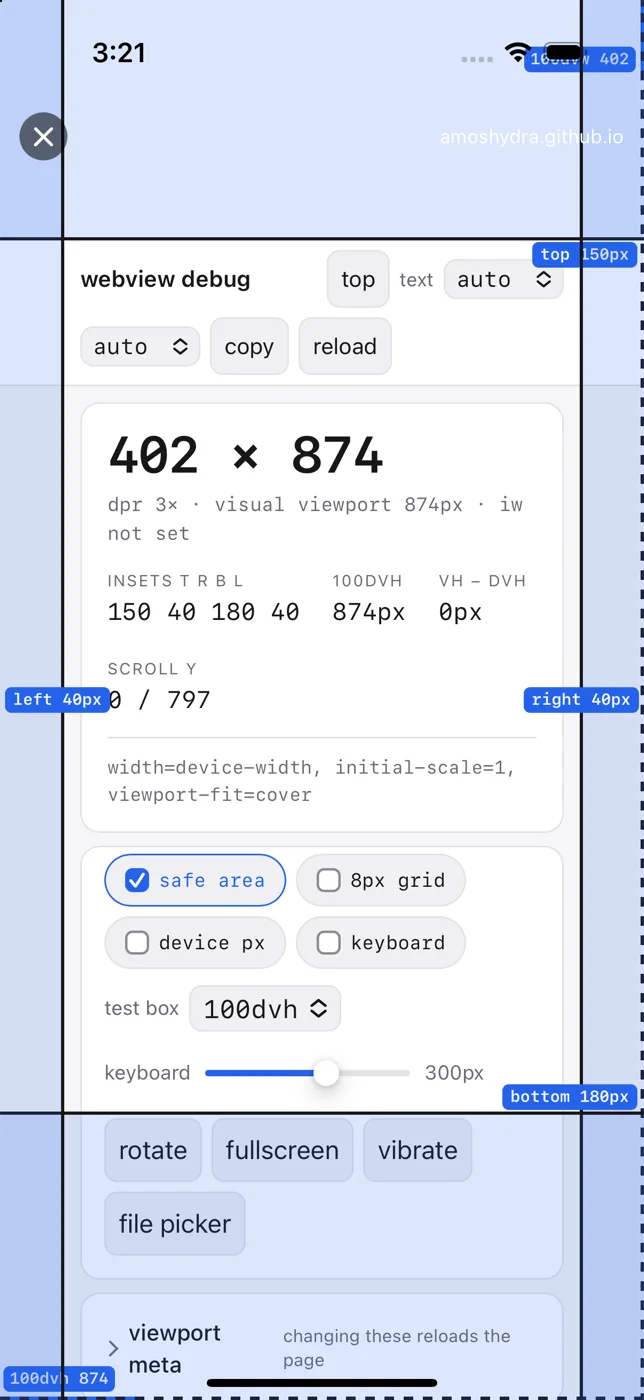
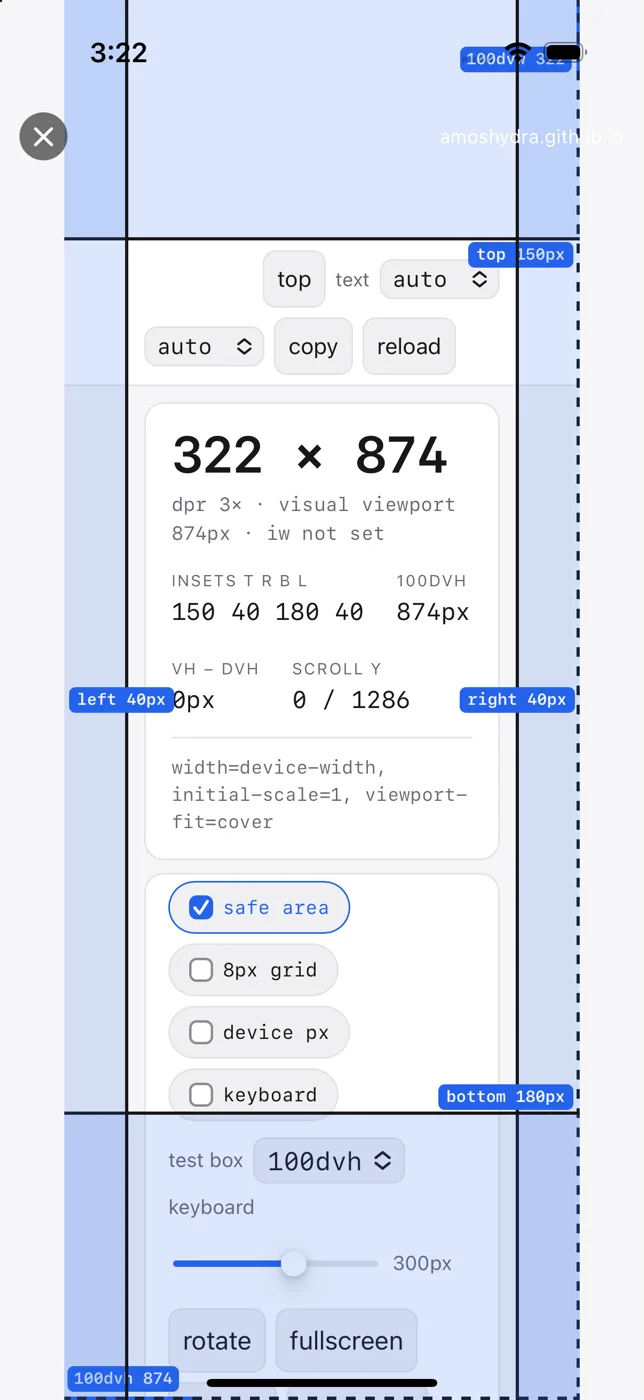
Two shots of the same page with the same override. env() and the
insets T R B L readout are identical; what differs is the viewport the page is
laid out in. Re-assert the line in updateUIView regardless, since a layout
change can reset it:
func updateUIView(_ webView: WKWebView, context: Context) { if let overridable = webView as? InsetOverrideWebView { overridable.insetOverride = insetOverride } webView.scrollView.contentInsetAdjustmentBehavior = .never // …}Straight from
WebViewScreen.swift.
3. Set the override before the first layout pass, in makeUIView and not from a
later callback. It is one of the first lines of
makeUIView,
and the Android host orders it the same way, before setContentView rather than
after.
Setting it late does not zero the reporting. It leaves the page laid out against the real safe area until something invalidates the geometry UIKit has memoised, and then it converges on the override without a reload. Same page, two runs, the only difference being when the assignment happens:
| Override assigned | First reading | Then |
|---|---|---|
In makeUIView, before the first layout pass | 150 40 180 40 | stays there |
| 1.0s later, from a callback | 62 0 34 0 | 150 40 180 40 at 562 ms |
The 562 ms is the didSet reaching a layout pass. If you go looking for the
symptom the post used to promise, zeros, you will not find it: the page is
briefly correct against the wrong insets instead.
That is about the first value only. Changing the override later, with the page already loaded, reaches the page on both platforms.
Changing the override while the page is loaded
Both mechanisms can be re-applied after the page has loaded, and on every runtime measured here the page followed without a reload. What changes is the extra step: setting the value is no longer enough, because something has to make the platform read it again.
On Android the override is applied inside onApplyWindowInsets, so a new value
does nothing until insets are dispatched again. Either call works:
webView.setInsetOverride(top, right, bottom, left);// then one of thesewebView.dispatchApplyWindowInsets(webView.getRootWindowInsets());webView.getRootView().requestApplyInsets();Both produced the same numbers on the OnePlus and both reached the page on the
next animation frame. Prefer requestApplyInsets(): it travels the hierarchy the
way a real insets change does, so it cannot skip a parent that consumes them,
which is the same mechanism that puts the Android floor at API 31.
On iOS there is no dispatch to trigger. Assigning the property is the whole
update, because its didSet calls setNeedsLayout() and
invalidateIntrinsicContentSize(), which is what invalidates the safe-area
geometry UIKit has memoised.
Sampled every animation frame, so “second frame” means the frame after the first one that drew:
| Runtime | Device | Correct after load | Live change seen by the page |
|---|---|---|---|
| 18.6 | iPhone 16 Pro | 847 ms, second frame | 150 40 180 40 to 300 80 360 80 |
| 26.5 | iPhone 17 Pro | 67 ms | 150 40 180 40 to 300 80 360 80 |
| 27.0 | iPhone 18 Pro Max | 165 ms | 150 40 180 40 to 300 80 360 80 |
| 27.1 | iPhone Duo | 276 ms | 150 40 180 40 to 300 80 360 80 |
| 27.2 | iPhone 18 Pro | 667 ms | 150 40 180 40 to 300 80 360 80 |
| Android 15 | OnePlus 6T, WebView 153 | 40 ms, second frame | 77 21 92 21 to 153 41 184 41 |
The Android row is the same two requests as the iOS rows, reported in CSS px after the division by dpr.
Those are single runs, and the runtime is not the whole story: 18.6 gave 463 ms on one simulator and 847 ms on another, which is the same non-determinism the sampled table below records.
nil still means the real system value after a change, not only at load.
Requesting 300 on the top edge alone gave the page 300 0 34 0 on every runtime,
with the untouched bottom edge reporting its real 34pt.
Neither launcher exposes this today. Android reads its overrides once in
onCreate and the settings screen finishes by starting a second
MainActivity, which reloads the page; on iOS the values live in the settings
screen, so changing them means leaving the page. The useful shape is a test loop:
run one page and walk it through no inset, a home bar, a notch and back, rather
than relaunching with different intent extras each time. After changing a value,
confirm the page moved, because from the native side a change that never reached
the page looks exactly like one that did.
The keyboard takes the bottom edge
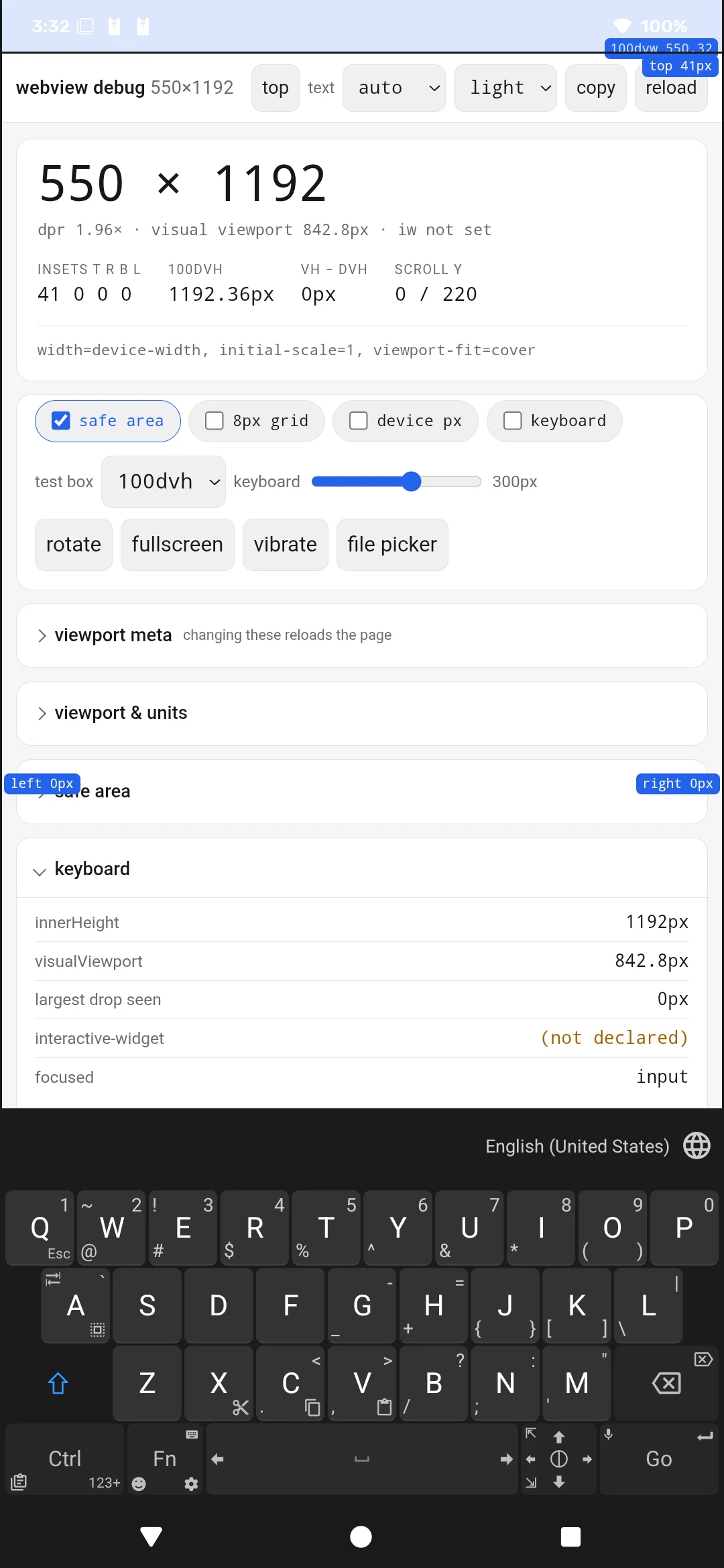
While a text field has focus, Android hands the bottom of the screen to the IME and the page’s bottom inset goes to zero, whatever the host asked for. The page below requested 180px, which is 92 CSS px at dpr 1.96, and the blue band is the safe area it was given:
| Keyboard closed | Keyboard open |
|---|---|
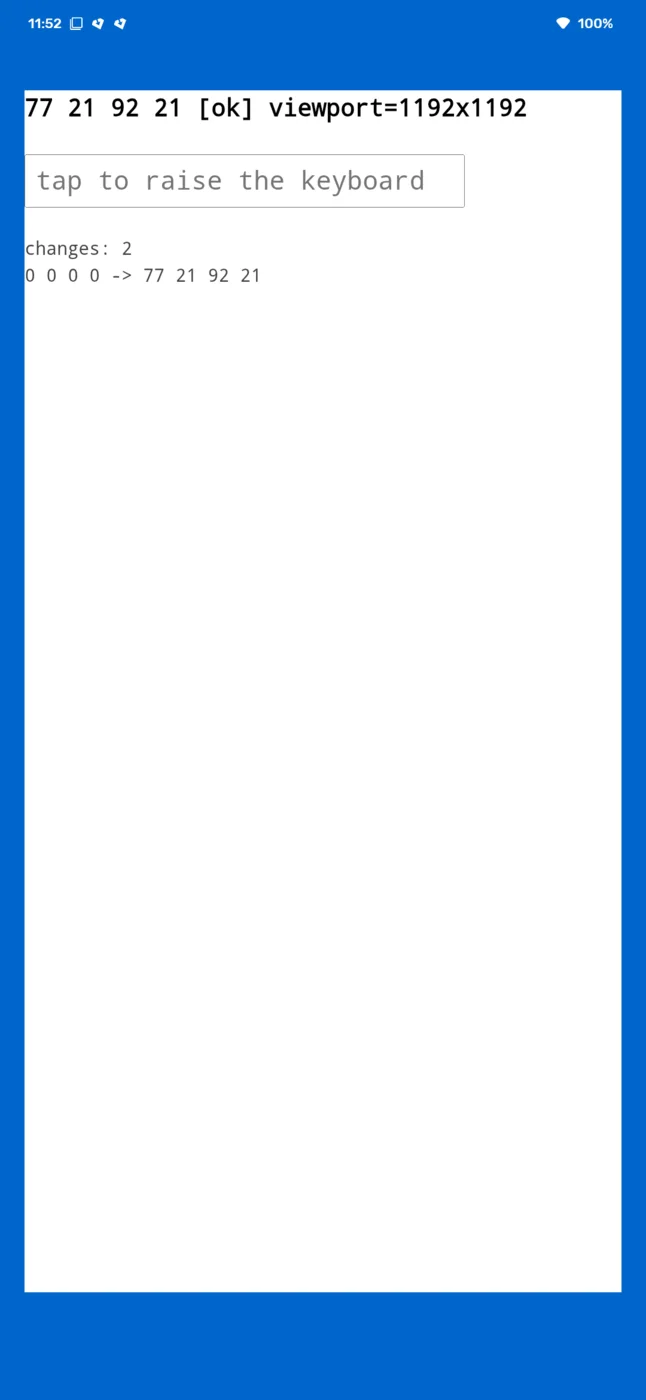 | 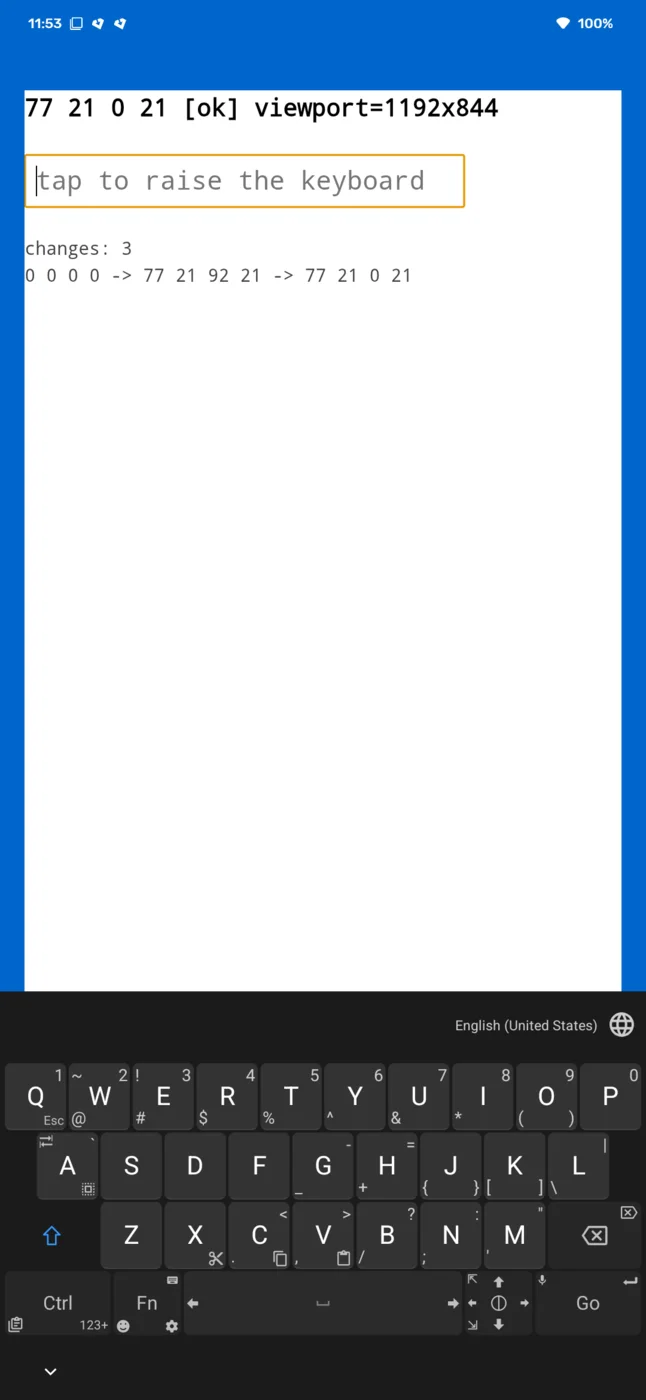 |
77 21 92 21 becomes 77 21 0 21, and the other three edges are untouched. The
override is still set throughout and the value returns when the IME closes, so
nothing reports a problem.
This matters most for the inflating case. A kiosk page that inflates its bottom inset to clear a home bar the device does not have loses exactly that margin the moment an input takes focus. The keyboard really does occupy that space, so read it as the platform handing the edge back rather than as the override failing, and do not build a layout that needs the bottom inset to survive a keyboard. iOS was not measured: raising the software keyboard needs Simulator.app, which this run did not have.
The keyboard is a second channel
The keyboard arrives through Android’s inset types, so this section is
Android-only. iOS has a single safe area and reports the keyboard only as a
visualViewport resize, with no inset type to override.
env(safe-area-inset-*) is only one of the two things a WebView reads out of the
same WindowInsets. Chromium’s WebView insets documentation
splits them:
WebView respects the following inset types:
displayCutout(),systemBars(),ime(). displayCutout and systemBars are forwarded to the web content via the safe-area-insets API. Theime()insets directly affect the size of the Visual Viewport.
The keyboard does not appear in env(). It arrives as a visual viewport resize,
and has done since WebView M139. An override that zeroes the safe-area types and
leaves ime() alone misses the keyboard.
What Android reports, before and after the keyboard
Measured on a Pixel 7 Pro (Android 17), in Gadgetbridge’s app-manager screen, by logging every inset dispatch. Values are device pixels; divide by ~3 for CSS pixels.
| statusBars() top | 334 |
| displayCutout() top | 144 |
| navigationBars() bottom | 71 |
| ime() bottom | 0 |
systemBars() = status + nav + caption | 71 |
| statusBars() top | 334 |
| displayCutout() top | 144 |
| navigationBars() bottom | 966 |
| ime() bottom | 966 |
systemBars() = status + nav + caption | 966 |
navigationBars() grew from 71 to 966, the height of the keyboard.
Gadgetbridge pads its content with getInsets(systemBars() | displayCutout()), so
that padding grew by the keyboard too.
Why the page then sees the keyboard twice
Two independent mechanisms each make room for the keyboard:
android.R.id.content by systemBars()ime() itself and shrinks its visual viewportime() insets directly affect the size of the
Visual Viewport.” Nothing to do with the app's padding.
this shrink is the WebView's doing The page’s layout viewport shrinks because its container got shorter; its visual
viewport shrinks because the WebView applied ime(). The keyboard is subtracted
twice, and the page is left with a band of empty, scrollable space between its
content and the keyboard.
The double-count needs a host that pads by systemBars() on a device where that
mask carries the keyboard. The launcher this post uses elsewhere does not pad, so
it does not show this; I could not reproduce it there in any configuration,
including matching Gadgetbridge’s target SDK, theme, soft-input mode and content
padding.
Which of the two to remove
The two captures below are the same build, page, override (150/40/180/40) and
keyboard; they differ by one line, whether the override zeroes ime() as well.
ime() passed through | ime() zeroed |
|---|---|
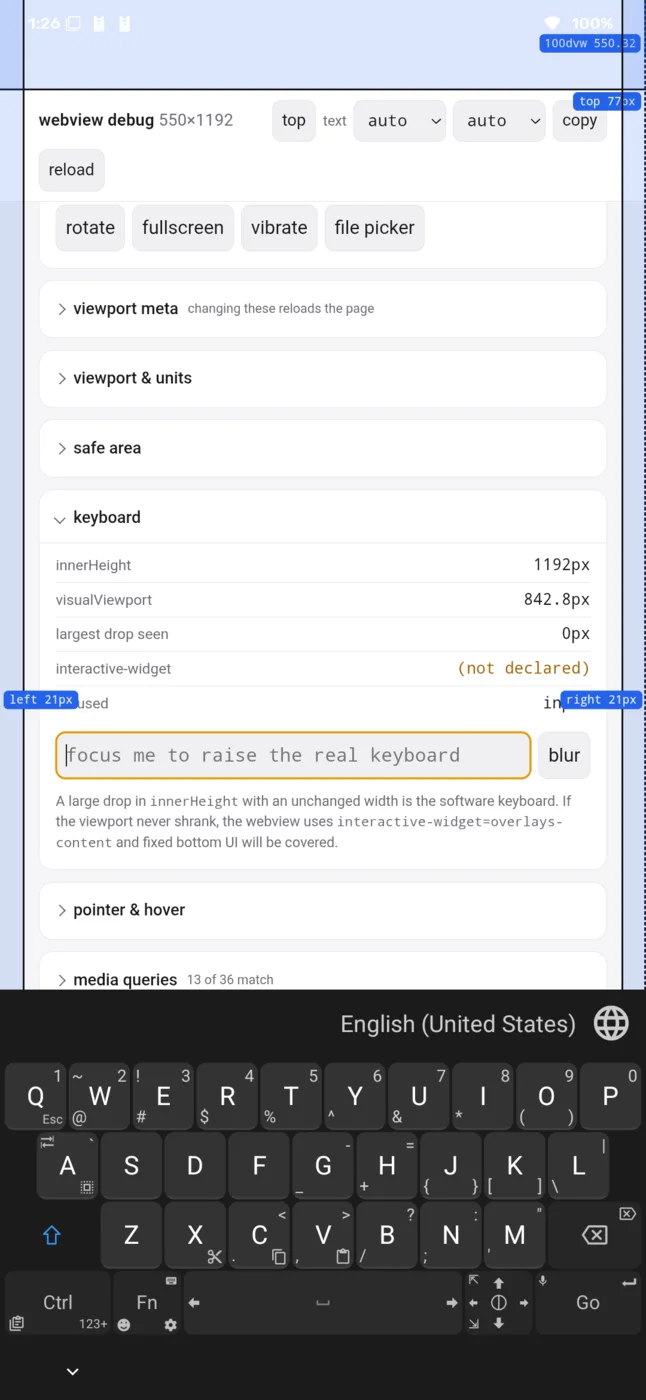 | 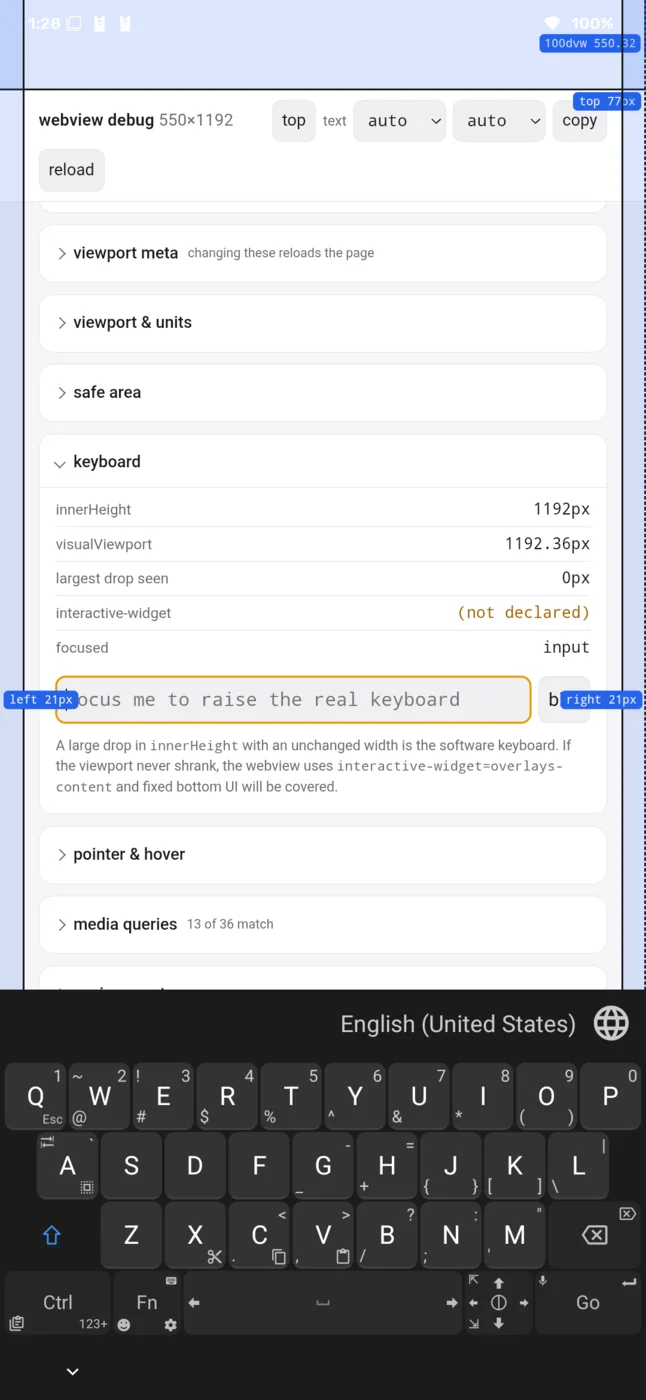 |
Read the keyboard card rather than the inset bands; the bands read 77 21 92 21
in both:
ime() passed through | ime() zeroed | |
|---|---|---|
innerHeight | 1192 | 1192 |
visualViewport.height | 842.8 | 1192.36 |
| keyboard | up | up |
Passing it through, the visual viewport sits 349.2px below the layout viewport,
which is the keyboard height, and the page can scroll the focused field into view.
Zeroing it, the WebView gets no ime() inset: the visual viewport stays at the
layout viewport, and anything laid out against the bottom of the viewport is behind
the keyboard with no event to say so. Chromium warns about exactly this in the same
document:
If you decide to opt out, some features may not work as expected. The keyboard may cover inputs near the bottom of the page and in some cases,
scrollIntoViewmay not work properly.
Zeroing a type without stopping the dispatch
There is a second way to get this wrong, and it is the tempting one. A host that
removes the insets by returning WindowInsetsCompat.CONSUMED from a listener on
the WebView’s parent is not replacing the values, it is stopping the dispatch.
ViewGroup.dispatchApplyWindowInsets skips its children once the insets come back
consumed, so the WebView is never handed anything at all, ime() included.
The two runs below are the same build, page and device, with the listener’s return value as the only difference:
Same build, same page, same device. The listener's return value is the only difference.
sysBars 0, ime 686 page: env 0, visual viewport 842.8 WindowInsetsCompat.CONSUMEDenv 0, visual viewport 1192.36 | WebView dispatches | env() | innerHeight | visualViewport.height | |
|---|---|---|---|---|
| rebuilt | 3 | 0 0 0 0 | 1192 | 1192.36 → 842.8 |
CONSUMED | 0 | 0 0 0 0 | 1192 | 1192.36 (flat) |
Both runs leave the page reading 0 0 0 0, so both look like a fix in a
screenshot:
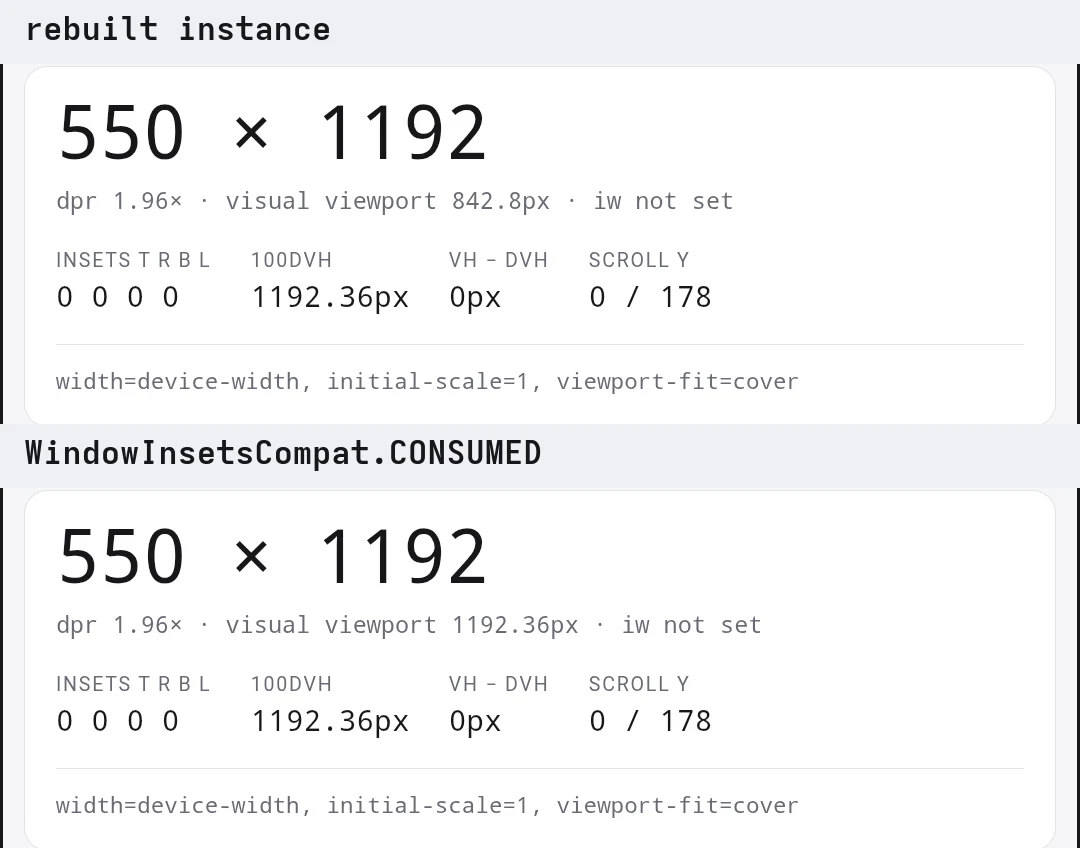
What separates them is the keyboard. The rebuilt run steps the visual viewport down
by the keyboard’s height; the consumed run does not move. A page that lays out
against the bottom of the viewport ends up behind the keyboard, with the same
missing event as zeroing ime() directly, except that nothing in the page’s
env() values hints at it.
interactive-widget cannot help from the page
The obvious page-side answer is the viewport meta:
<meta name="viewport" content="width=device-width, initial-scale=1, viewport-fit=cover, interactive-widget=overlays-content">overlays-content promises that neither viewport is resized by the keyboard.
Android WebView ignores it. Chrome for Android has honoured interactive-widget
since Chrome 108, and
that announcement says so outright:
Note: These changes do not affect WebView
Chromium’s issue tracker agrees, in
the entry recording it: “There is no intended behavior change for Android WebView.
The Android app is responsible for sizing the WebView and can implement either mode
via windowSoftInputMode”, and its compatibility table reads Android Chrome: OK · iOS Safari: OK · iOS WKWebView: OK · Android Firefox: OK (>= 132.0) · **Android WebView: FAIL**.
Blink does parse it: ViewportDescription.virtual_keyboard_mode is populated from
the meta and forwarded to the browser process, and the embedder does not act on
it. The capture below declares overlays-content; the page reports it, and nothing
else moves:
declared overlays-content |
|---|
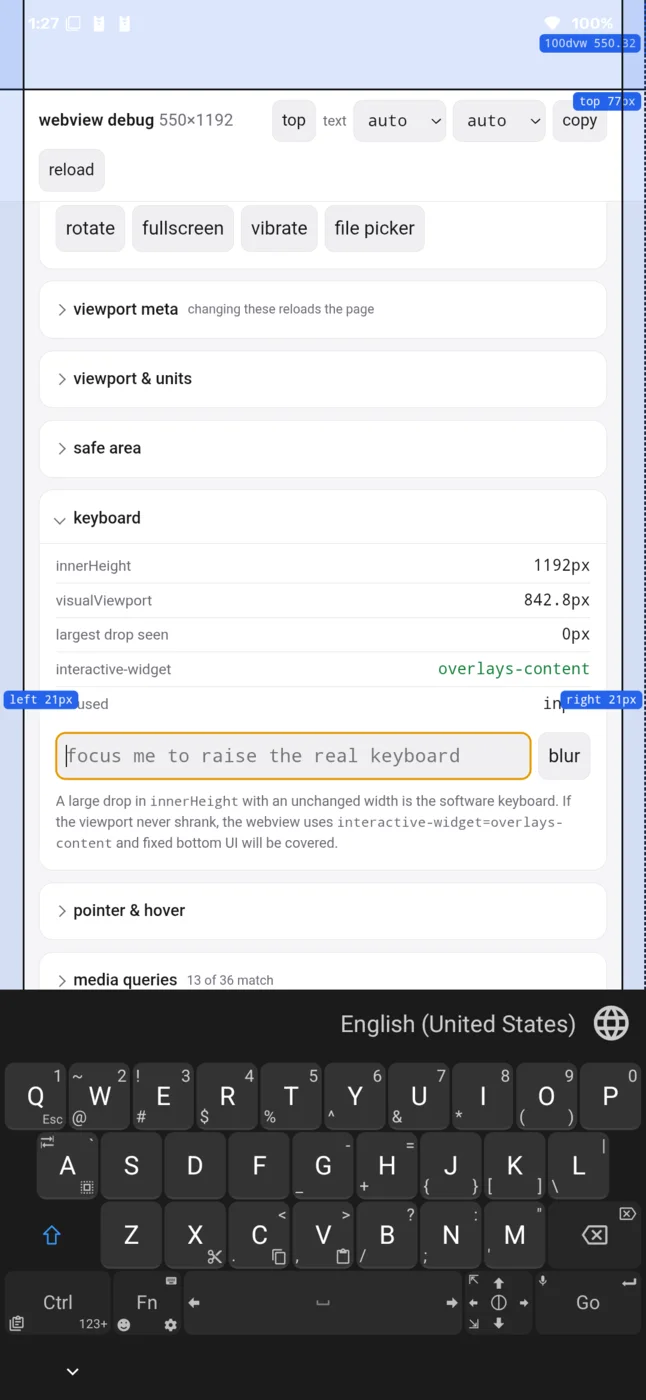 |
innerHeight 1192, visualViewport 842.8, the same two numbers as the
ime()-passed-through capture: the keyboard resized the visual viewport as if the
property were absent.
Reading what the page sees
The page’s env() values are the only evidence that any of this worked, and the
obvious way to read them reports a working override as broken. Every table above
comes from a page that samples on a timer or on a frame rather than once. A
single read from the same pages at load would have reported zeros.
A single read lands in the zero window
WebKit bug 191872, open since 2018 and still open:
These CSS variables are not available on the initial load of the app, or after the window load event, or the document DOMContentLoaded event. These CSS variables only seem to be available at some arbitrary time after the app is loaded.
A comment from 2023 notes the same on iOS 16, and that because it is
non-deterministic it is “very hard to work around manually”. Measuring in
webView(_:didFinish:) lands inside exactly the window where the values are
guaranteed to be zero.
I hit this. My first test read once on didFinish, got 0px on all four edges,
and I wrote it up as “the override does not work on iOS”. It does work. Sampling
12 times over 6s and recording the history:
label=edgeToEdge=true top=150.0 right=40.0 bottom=180.0 left=40.0 | native webview=t:150 r:40 b:180 l:40 window=t:62 r:0 b:34 l:0settled={"top":"150px","right":"40px","bottom":"180px","left":"40px"}distinctReadings=2history: [0] {"top":"0px","right":"0px","bottom":"0px","left":"0px"} [1] {"top":"150px","right":"40px","bottom":"180px","left":"40px"}Reading [0], which is what the single read returned, looks like total failure.
How many samples it takes is not predictable:
| Runtime | Device | Distinct readings |
|---|---|---|
| 18.6 | iPhone 16 Pro | 2, zero then override |
| 26.5 | iPhone 17 Pro | 1, override immediately |
| 27.0 | iPhone 17 Pro | 2, zero then override |
| 27.0 | iPhone 18 Pro | 2, zero then override |
| 27.1 | iPhone Duo | 1 on the first run, 2 on a later one |
Twelve samples, half a second apart, starting at page finish. A count of 1 means the very first sample was already correct.
The Duo is the row to read twice. The run behind this table found the override already correct on its first sample. A later run, same device and same runtime, read all four edges as zero first and needed the second sample. Identical hardware and identical runtime, two answers, which is the argument for sampling over time rather than for counting.
The same iPhone 17 Pro needed two samples on 27.0 and one on 26.5. Any test of this has to sample over time; a single read is a coin flip.
Android reads zero at the same moments and recovers faster. On the OnePlus the
page reported 0 0 0 0 while its script ran, at the load event, and on the
first animation frame, then 77 21 92 21 on the second frame about 40 ms later.
So the rule is the same on both platforms and the reason differs. Android needs
one frame; iOS needs a wait that is not predictable.
Resolving env() through a probe element
env() has no JavaScript API, so the only way to observe what a page sees is to
resolve it through a probe element and read the computed style:
var p = document.createElement('div');p.style.cssText = 'position:fixed;top:0;left:0;visibility:hidden;' + 'padding-top:env(safe-area-inset-top,0px)' /* … */;document.body.appendChild(p);var cs = getComputedStyle(p);cs.paddingTop; // "150px"Sample it per animation frame rather than once. One read can land in the zero window, and a per-frame sampler both avoids that and shows you when the value arrived. That is how the runtime section above was measured.
This is the probe from
EnvProbe.readEnv,
with the comment it carries explaining why the probe element exists at all: there
is no JS API for env(), so reading the value out of the page is the only honest
check.
Three guards make a reading trustworthy:
Prove env() is supported. Read it with a fallback. If
env(safe-area-inset-top, 77px) returns 77px, env() is unsupported and every
other number is void. Reading 0px proves it resolved to a genuine zero. Pick a
fallback no override is likely to produce, because a sentinel that collides with
a real value reports a working env() as unsupported. The viewport-fit=cover
half of that guard is
readViewportFit in the same file.
Capture the native value too, so the two can be compared:
let safe = webView.safeAreaInsets // t:150 r:40 b:180 l:40let window = webView.window?.safeAreaInsets // t:62 r:0 b:34 l:0If they diverge, the override never reached env(). If they agree and the page
still reads zero, the reading is what is wrong, not the override.
Agreement is necessary but not sufficient, and condition 2 is the case that proves
it. There, safeAreaInsets and env() matched exactly while the page was laid
out in the wrong viewport. So a check that only compares inset numbers passes on
a page that is visibly broken. Pair it with the geometry, which is the one reading
that caught it:
[document.documentElement.clientWidth, document.documentElement.clientHeight];// "402 x 874" under .never, "322 x 544" under .always, same overrideTest matrix
iOS, all Simulator, Xcode 27.0 (27A266a), deployment target iOS 17.0. The device names are the ones the run used. On a current Xcode the device set differs, so “iPhone 18 Pro” is a 27.2 device there and 27.0 offers iPhone 18 Pro Max instead. Match on the runtime and the reported insets, not on the device name:
| Runtime | Device | Overrides | Blank → real | Condition 2 |
|---|---|---|---|---|
| 18.6 | iPhone 16 Pro | 150/40/180/40 ✓ | 62/0/34/0 ✓ | all four values ✓ |
| 26.5 | iPhone 17 Pro | 150/40/180/40 ✓ | not recorded | .never and .always ✓ |
| 27.0 | iPhone 17 Pro | 111/44/222/33 ✓ | 62/0/34/0 ✓ | not run |
| 27.0 | iPhone 18 Pro | 111/44/222/33 ✓ | 62/0/34/0 ✓ | not run |
| 27.1 | iPhone Duo | 150/40/180/40 ✓ | not recorded | not run |
Android, physical device on Android 15 (API 35), WebView 153.0.8010.36, dpr 1.96:
| Config | Requested (px) | Page env() |
|---|---|---|
| none | no override | 41 0 0 0 |
| override | 150/40/180/40 | 77 21 92 21 |
The launcher screens
Both hosts expose the same controls: a URL, optional JavaScript, an edge-to-edge
switch, and one field per edge. The Android build is captured with edge-to-edge
off, which is its default. That is why the four inset fields are greyed out.
The iOS build is captured with it on and 150 / 40 / 180 / 40 entered.
| Android, edge-to-edge off (default) | iOS, edge-to-edge on, override entered |
|---|---|
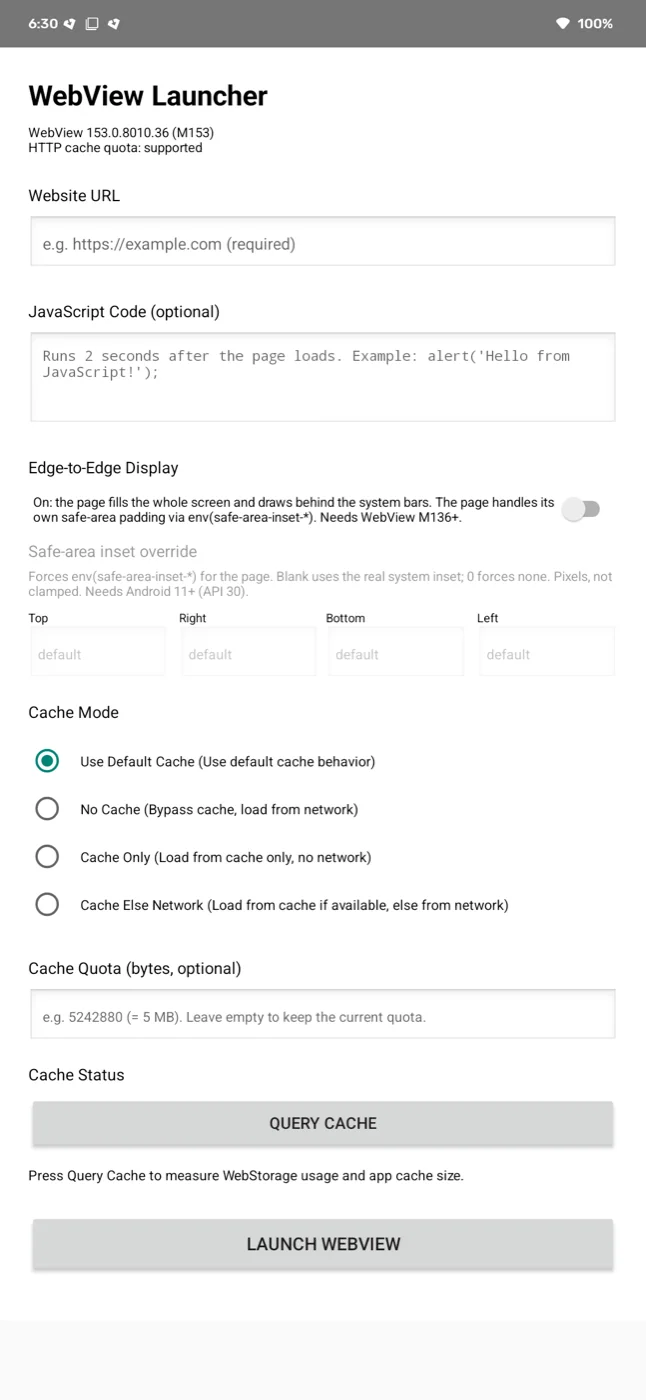 | 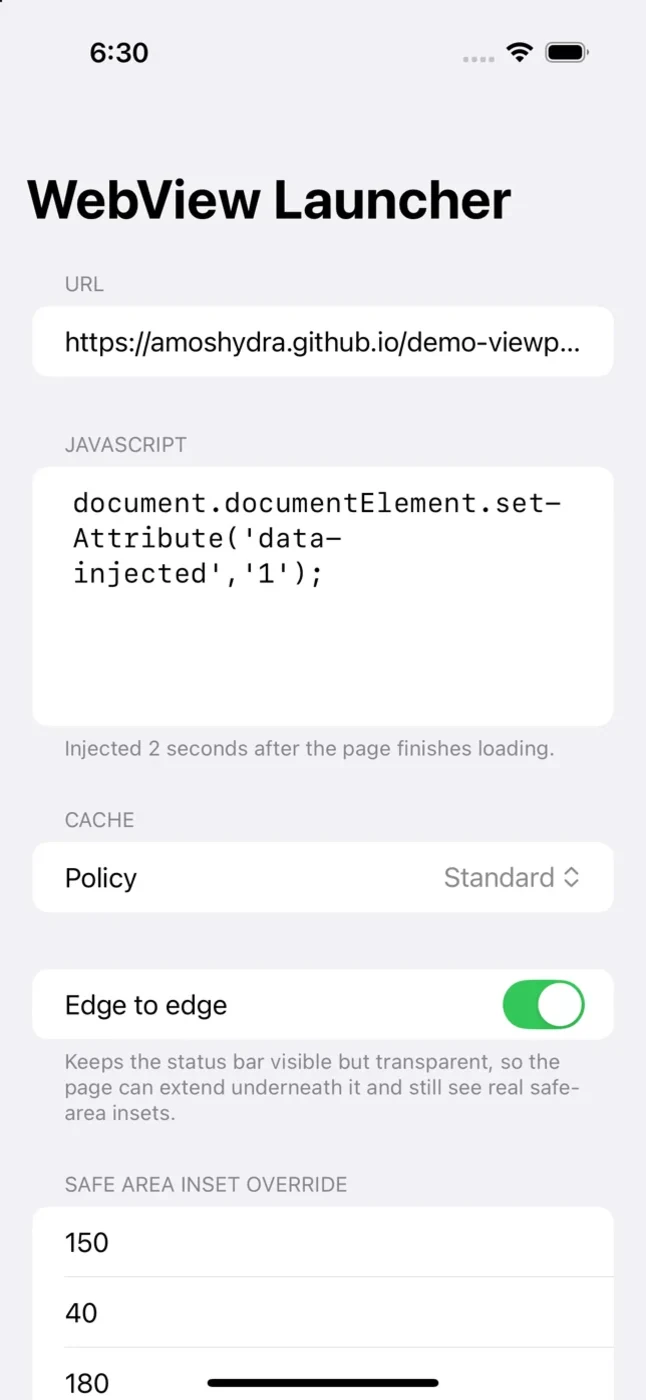 |
Configurations used for every screenshot in this post:
| Android | iOS | |
|---|---|---|
| Build | com.amoshydra.androidapp 1.0 | com.amoshydra.iosapp 1.0 |
| WebView / SDK | WebView 153.0.8010.36 (M153) | iOS Simulator 18.6 |
| Device | physical, 1080×2340, dpr 1.96 | iPhone 16 Pro simulator, 402×874 pt, dpr 3 |
| Edge-to-edge | on | on |
| Inset units | pixels | points |
| Page | demo-viewport/?fit=cover | demo-viewport/?fit=cover |
| Override requested | 150 / 40 / 180 / 40 | 150 / 40 / 180 / 40 |
Sources
The two hosts and the debug page that every number above comes from. File links are pinned to a commit, so the line numbers hold.
- Android host:
amoshydra/android-webview-launcher. The override isInsetAwareWebView.onApplyWindowInsetsandapplyOverrides. The edge-to-edge window setup, and the ordering that has to happen before the first layout pass, are inMainActivityandapplyWindowMode. - iOS host:
amoshydra/ios-webview-launcher, written as the port of the above and verified on five simulator configurations. The whole override is one getter, inInsetOverrideWebView.contentInsetAdjustmentBehaviorand setting the override before the first layout pass are inmakeUIViewandupdateUIView, and the sampling behind thehistory:block isEnvProbe.run. - Debug page in every screenshot:
amoshydra/demo-viewport, live atamoshydra.github.io/demo-viewport/?fit=cover. It reports the viewport, the safe-area insets and thedvh/svh/lvhunits; every number quoted above is its ownINSETS T R B Lreadout.
Appendix: iPhone Duo
The iPhone Duo is Apple’s first foldable, announced 9 September 2026, a 5.4” outer display (1398×2034) that opens to a 7.6” inner one (1878×2670). It ships with iOS 27.1, which is also the floor the simulator enforces for the device type.
Worth a look because its safe area is a different shape from every Pro model, and it changes shape twice over. No override set, edge-to-edge on, all four poses, measured on both SDKs:
The SDK decides whether you get edge-to-edge at all
Start with Xcode 27.0, because the number that comes back is not the display size. The Duo’s inner panel is 951 points wide, and an app built with the iOS 27.0 SDK does not get it: iOS gives the app a window of 871 points and leaves the remaining 80 in a black rail, so the page never learns the extra space exists.
The status bar is a vertical bar on the Duo, occupying a reserved region at the outer edge. Whether an app may extend underneath it is decided by the SDK it is built against, not by anything in the app:
| Built against | Outer display | Inner display |
|---|---|---|
| Pre-iOS 27 SDK | Letterboxed | Letterboxed |
| iOS 27.0 SDK | Letterboxed | 871 of 951 points |
| iOS 27.1 SDK | Edge to edge | Edge to edge |
Same app, same code, same page, same pose — only the SDK differs. Each row is one orientation, the 27.0 build on the left and the 27.1 build on the right:
| Pose | Xcode 27.0 — letterboxed | Xcode 27.1 — edge to edge |
|---|---|---|
| Outer, portrait | 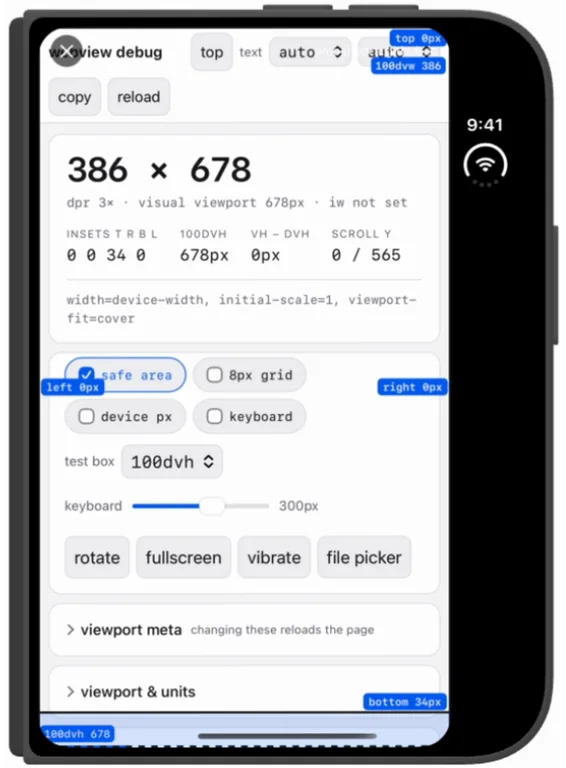 | 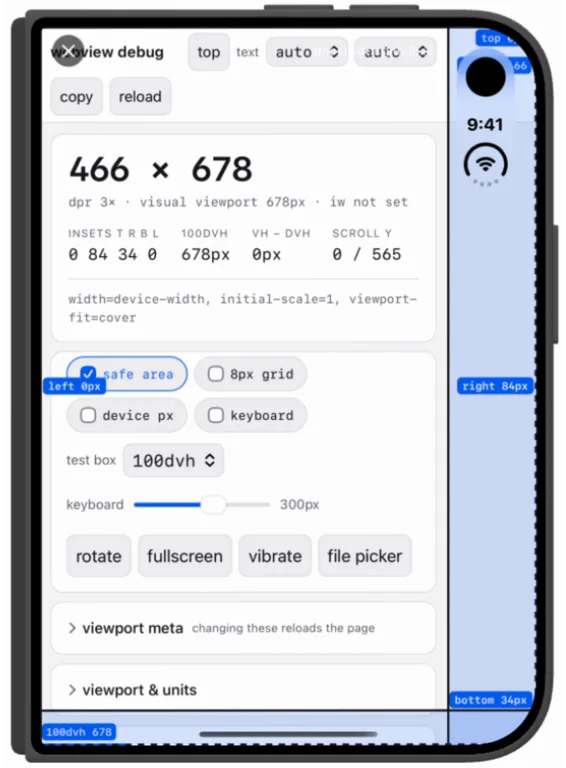 |
| Outer, landscape | 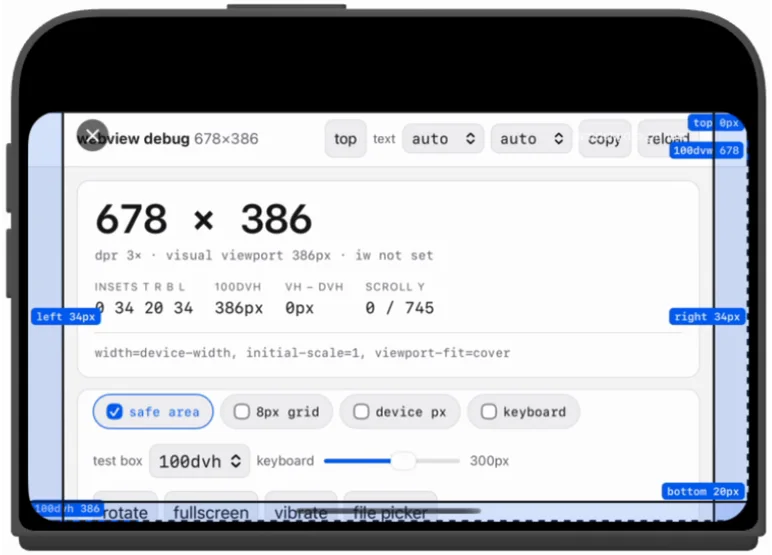 | 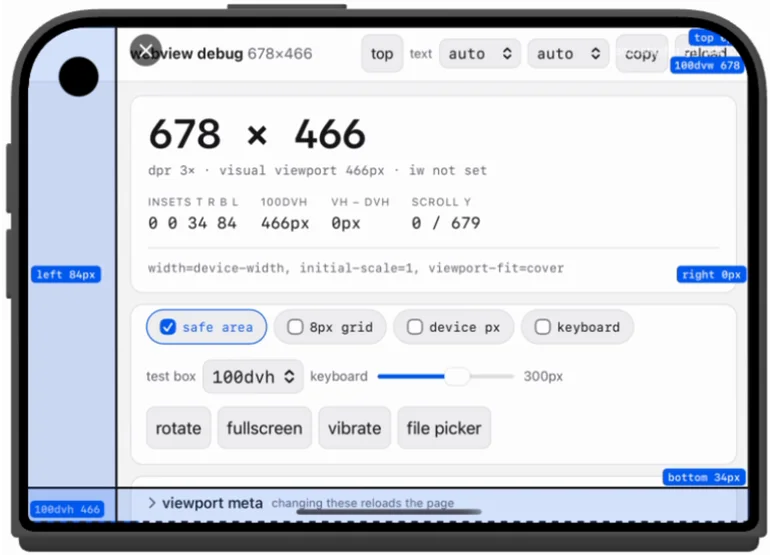 |
| Inner, landscape | 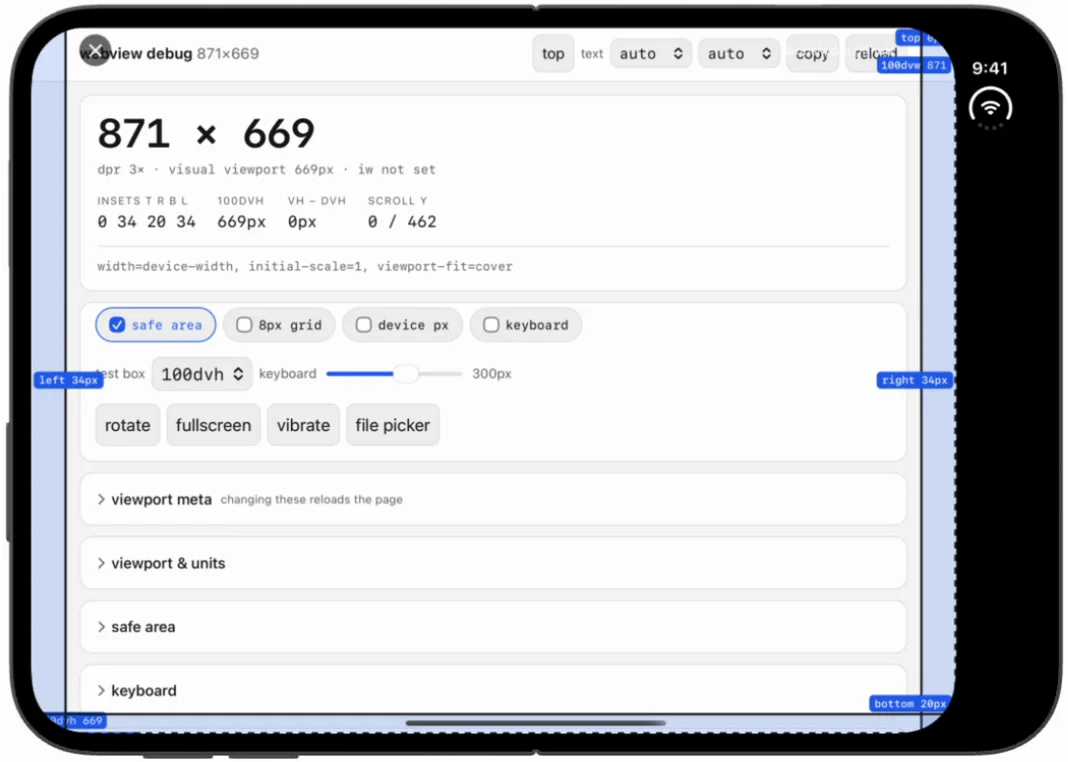 | 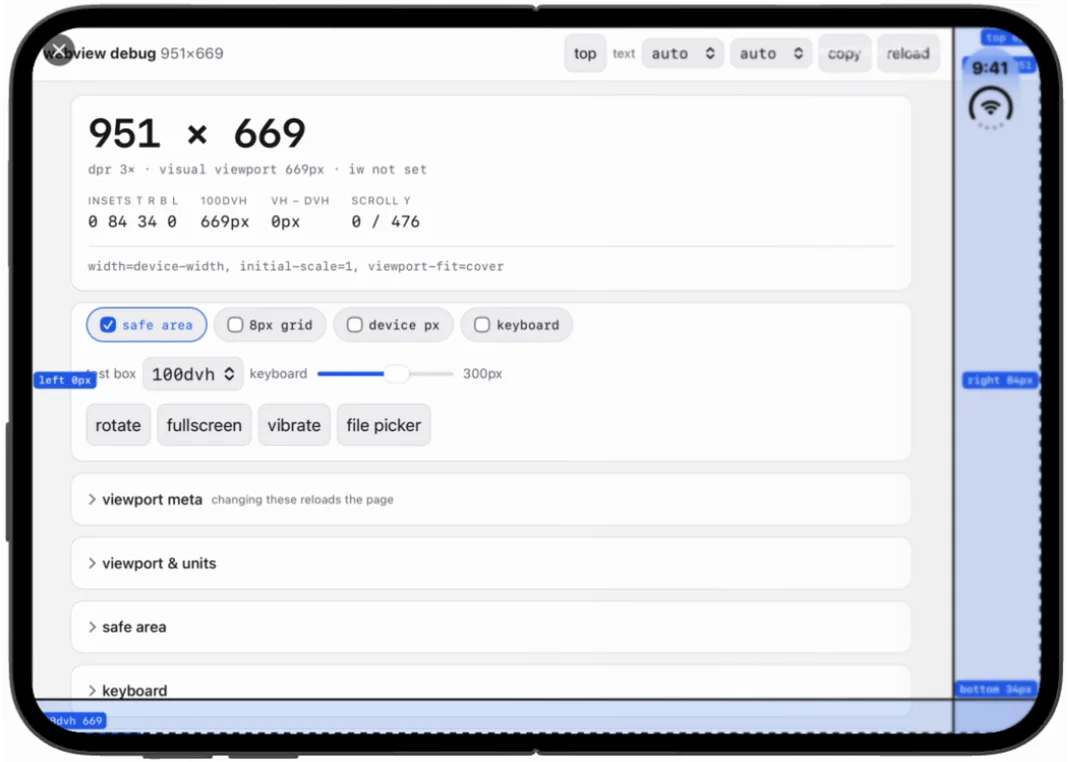 |
| Inner, portrait | 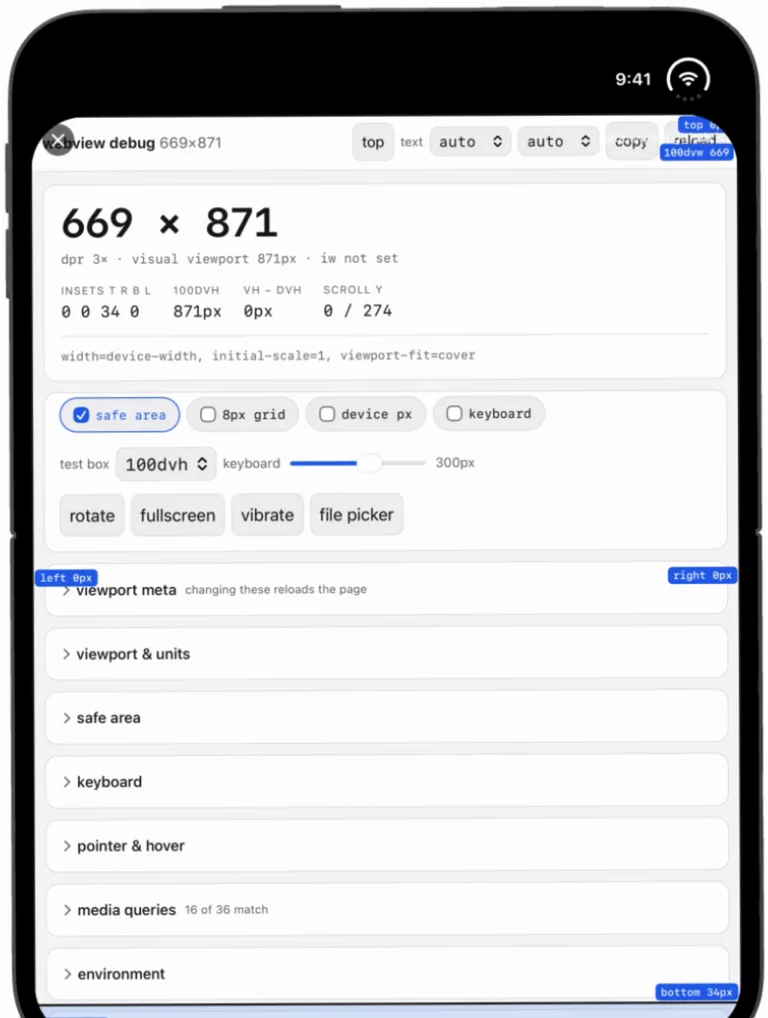 | 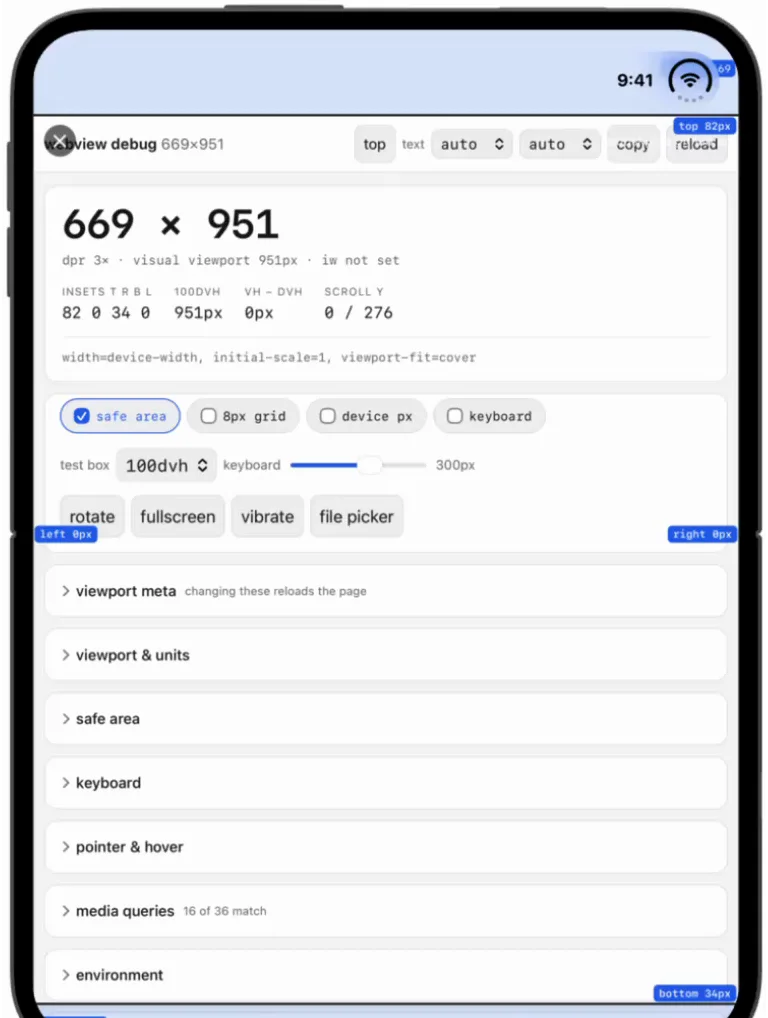 |
Read the readouts across each row and one number dominates: the rail is 80 points
in all four, on both displays, in both orientations. 386 is 466 less 80.
678 × 386 is 678 × 466 less 80. 871 is 951 less 80. 669 × 871 is
669 × 951 less 80. It is a fixed deduction, not a proportion of the display, which
is why the outer display loses a quarter of its width while the inner one loses less
than a tenth of its height.
The other number that matters is the 84, and it is the status bar’s real
reserved region — but it moves. It is on the right in outer portrait (0 84 34 0),
on the left in outer landscape (0 0 34 84, the edge with the camera cutout), on the
right in inner landscape (0 84 34 0), and along the top in inner portrait
(82 0 34 0). It follows the hardware, so a page cannot hardcode which edge it
lands on; it has to read env() every layout.
That 34pt on a 27.0 build is the trap: it is the letterbox boundary being reported as if it were a safe area, not a system inset. A 27.1 build reports 0 there and instead gives a real 84pt for the status bar, which is the inset a page can actually lay out against.
Snapped to a side, unfolded
Split the inner display and the letterbox stops being a fixed 80pt deduction from a known display size — it comes out of whatever region iOS actually grants the app, and the page is told about it in a way that no longer adds up.
| Unfolded, split | Xcode 27.0 | Xcode 27.1 |
|---|---|---|
| Snapped left | 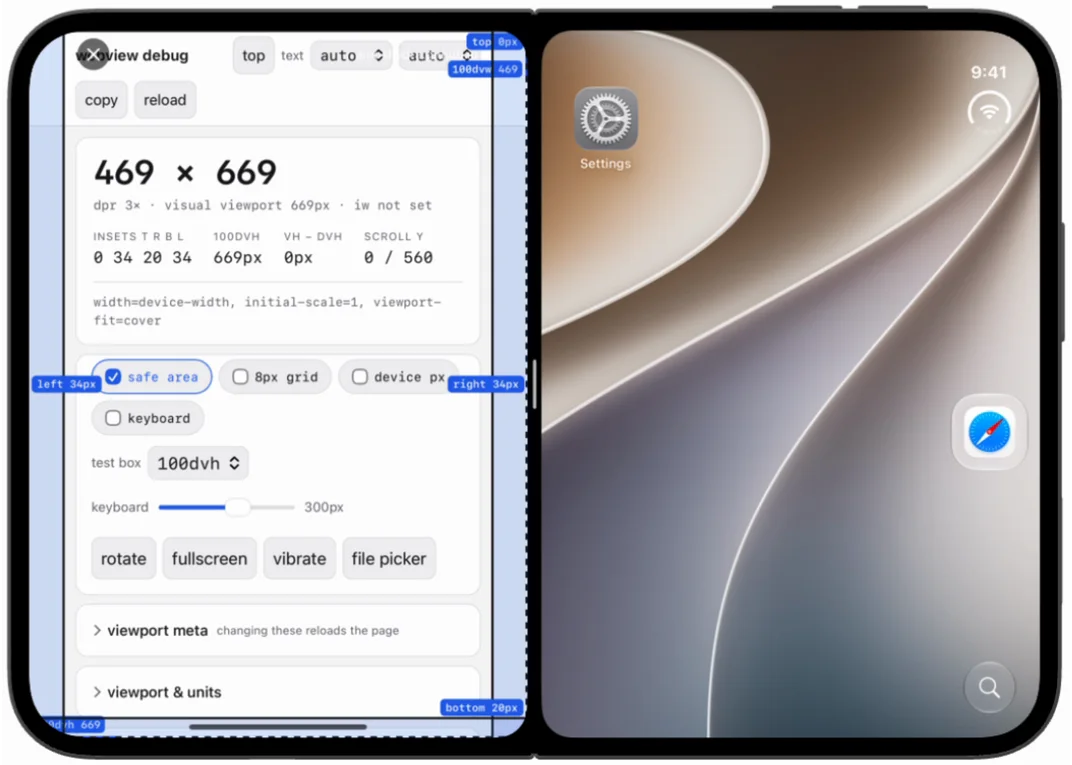 | 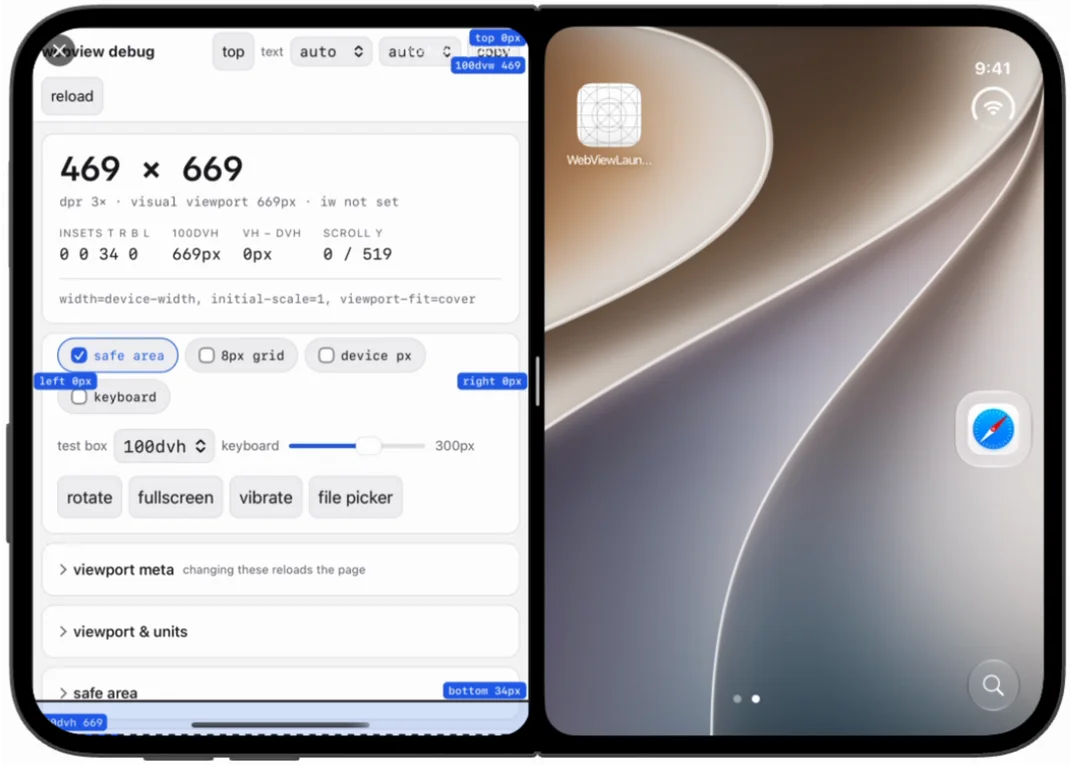 |
| Snapped right | 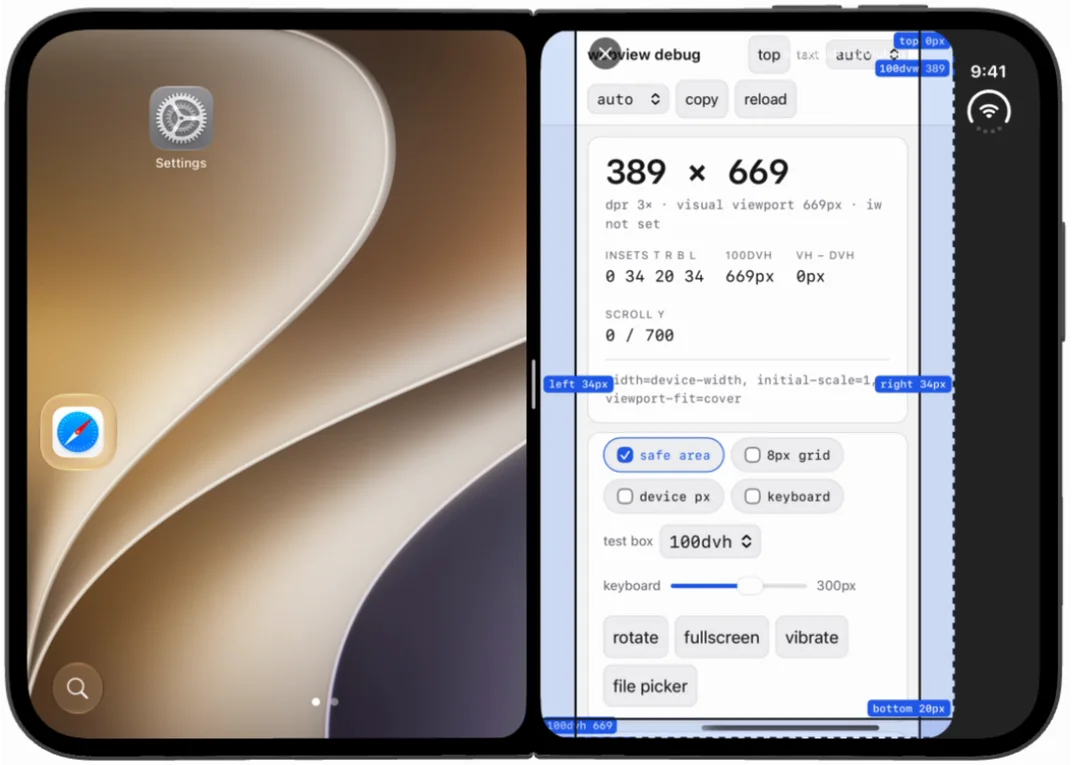 | 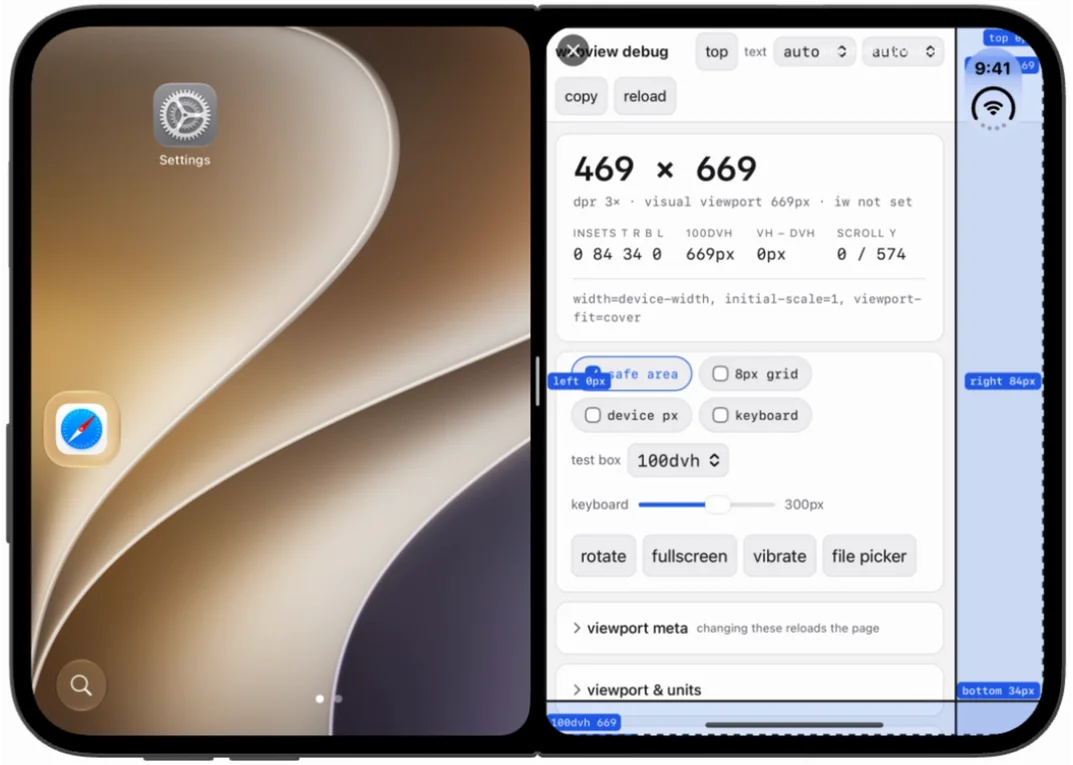 |
| Window | 469 × 669 → 389 × 669 | 469 × 669 either way |
| Insets | 0 34 20 34 either way | 0 0 34 0 → 0 84 34 0 |
Three things fall out, and the last is the one that breaks a layout.
The 80pt comes out of the app’s own region. Snapped right, the 27.0 build gets 389 points where the 27.1 build gets 469 — the same 80 the letterbox took from the full-width case. It is not a fixed margin around the display; it is subtracted from whatever the app was given, so the narrower the region, the more of it the rail consumes.
Snapped left, 27.0 loses nothing. It reports the same 469 points as 27.1, which is what makes the bug easy to miss: a build can look correct in one arrangement and be 80 points short in another, with no change in code.
The reported inset is wrong by 50pt exactly where it matters. Snapped right on
27.0 the page reads 0 34 20 34. It needs 84 — that is the status bar’s real
reserve, as the 27.1 build on the same row reports. So a page that pads its content
by env(safe-area-inset-right) pads 34 against a real requirement of 84 and
under-pads by half. The override does not help here: it can only add insets, and
the value it would be correcting is one the page believes.
Relaunch before you measure. Rotating the Duo out of split view does not
re-apply the letterbox. Snap the app to one side, turn the device to portrait, and
the window comes back at the full 669 × 951 even on a 27.0 build — no rail, and
the readout looks exactly like a 27.1 result. Hiding and reopening the app puts the
669 × 871 rail straight back. So a 27.0 window that looks edge-to-edge is stale
geometry carried over from the split view rather than a change in behaviour, and a
measurement taken in that state records a full-size window that no clean launch of
that build will ever produce.
This matters for the override. The left and right insets it writes are
per-edge, so it still works either way — but on a 27.0 build it is writing into a
window the system already cropped, and any page compensating for
env(safe-area-inset-right) is compensating for a boundary that would not exist on
a 27.1 build. For the Duo, use Xcode 27.1 or later. Getting there is only
DEVELOPER_DIR:
DEVELOPER_DIR=/path/to/Xcode-27.1.app/Contents/Developer \ xcodebuild -project WebViewLauncher.xcodeproj -scheme WebViewLauncher \ -sdk iphonesimulator build CODE_SIGNING_ALLOWED=NONote that the runtime is not the SDK. A 27.1 simulator runtime is enough to create the device and run on it, which is how the two SDKs can be compared on the same pose, but the app still compiles against whatever SDK the selected Xcode ships.
Two things fall out of that.
No top inset, ever. Compare the Pro models at 62 0 34 0: the outer display
has no notch and, in the simulator, no status-bar inset, so the top is 0 in all
three states. A 150pt top override here is not restating an existing value the way
it is on a Pro, it is manufacturing an inset the hardware does not have, which is
the case where the override is most useful and hardest to test against real
hardware.
The insets move with orientation and fold. In portrait the whole 34pt is at
the bottom, for the home indicator. Rotate to landscape, or open the inner
display, and it splits: 34pt on each side, 20pt at the bottom. Anything that
hard-codes env(safe-area-inset-bottom) to size a footer is wrong in two of these
three states, and nothing in CSS warns you.
With 150 / 40 / 180 / 40 requested, the outer display reported exactly those
values back. Whether the very first sample already had them varies between
runs, which the timing table above records.